1 Overview & Key Takeaways
Matt Pocock introduces his /handoff skill — a simple but powerful productivity pattern for AI-assisted coding. The skill compresses the relevant slice of a context window into a Markdown file that can be passed to a fresh agent session, enabling multi-session workflows without polluting the current session's focus.
🔑 Key Takeaways
- Context windows have a "smart zone" (early) and a "dumb zone" (past ~120K tokens) — even if the model advertises 1M tokens.
/compactis useful for continuing a single long session, but it clobbers your current context when you want to branch./handofflets you fork context to a new session while keeping the current one pure and focused.- The handoff document is plain Markdown → works across any agent (Claude Code, Codex, Copilot CLI, etc.).
- Powerful pattern: Grilling → Handoff → Prototype → Handoff back (DIY sub-agent).
- Handoff docs should be saved to the OS temp directory (disposable), never committed.
- Always describe the purpose of the next session when handing off.
2 Context Windows & the "Dumb Zone"
As a coding session progresses, the context window fills with conversation turns, tool calls, and file edits. Claude Code offers up to 1M tokens, but performance degrades well before that limit.
- Smart zone (early): Fewer attention relationships → the agent is sharper and more focused.
- Dumb zone (past ~120K tokens): Attention becomes diffuse → noticeably worse responses.
- Practical usable budget ≈ 120K tokens, regardless of advertised maximum.
- You must budget context efficiently and stay aware of usage at all times.
3 Compact — Strengths & Limits
Compact summarizes a bloated context window so you jump back from the dumb zone into the smart zone — within the same session.
How Compact Works
- Takes the current large conversation.
- Summarizes it (referenced files, user statements, tone).
- Places the summary at the start of a new session.
- Subsequent compactions create "sediment" layers from prior conversations.
Auto-compact: Some harnesses automatically trigger compaction when you approach the context limit.
Where Compact Shines
- Long single-session debugging — barrel through, compact, retry.
- Maintaining continuity on one problem.
Where Compact Falls Short
- You spot an out-of-scope task mid-session.
- You want to branch into a parallel session without losing progress.
- You need to keep the current session "pure" and focused.
4 The Handoff Skill — Why It Exists
Mid-session you notice something out of scope. Your options without handoff:
- Extend current session → diluted context, likely hit dumb zone, can't finish original goal.
- Compact → clobbers current session progress.
What you actually want: extract just the relevant slice of context for the side task, hand it to a new session, keep your current session untouched.
The /handoff skill:
- Lives in Matt's skills repo (
skills/productivity/handoff). - Writes a handoff document summarizing the conversation so a fresh agent can continue.
- Saves to the OS temp directory (not the workspace).
- Matt found himself doing this manually so often he formalized it into a skill.
5 Handoff During Grilling Sessions
Matt most often uses /handoff during "grilling" sessions — structured Q&A sessions with the agent for planning features.
Example — Sand Castle Feature Planning
- Mid-grilling (Q2), he realizes moving iterations/completion signals to a separate API belongs in a different session.
- Calls
/handoffwith a description of why and what. - Two benefits:
- Sharpens the current grill — "Q2 collapses" (scope narrows).
- Creates a focused Markdown file for the next session.
- Later, passes the handoff doc to another agent to file a GitHub issue.
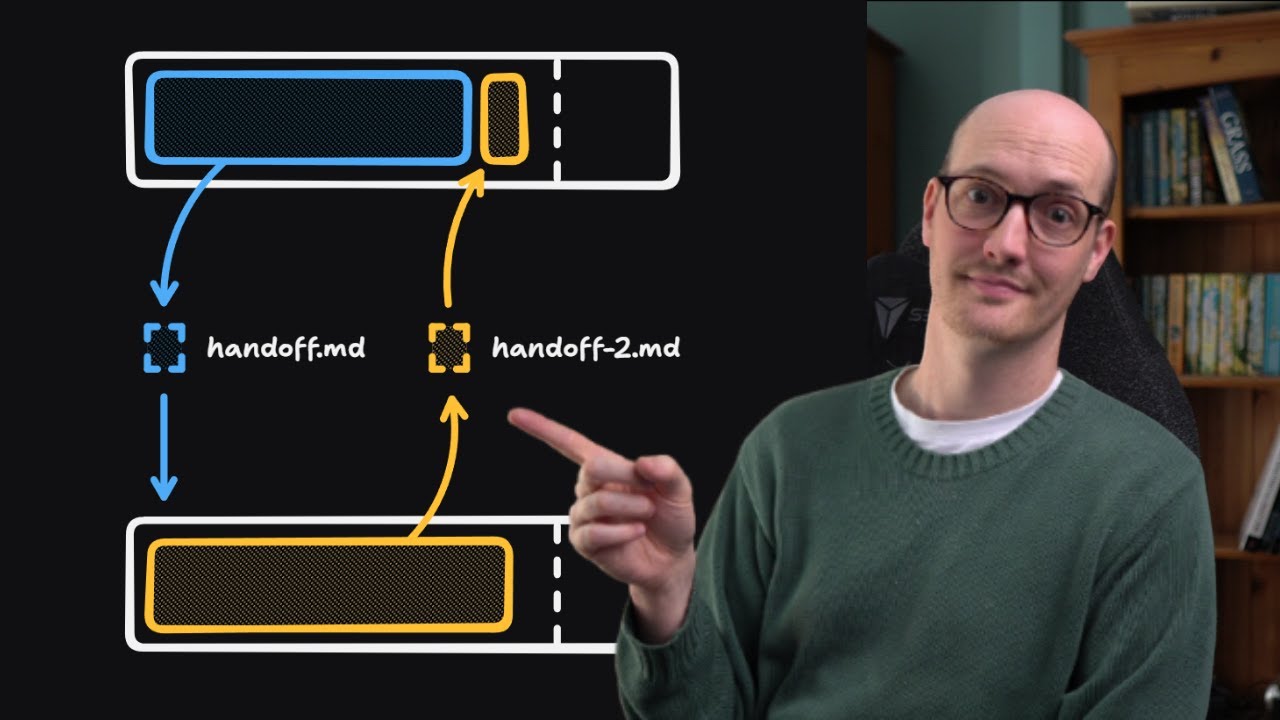
6 Handoff → Prototype → Handoff Back
During grilling, some questions can't be answered without seeing code — UI prototypes, tricky logic. The solution is the round-trip handoff:
This is the "DIY sub-agent" pattern: use a full context window for one specific task, compress learnings, pass back to the parent session.
7 Cross-Agent Portability
Because handoff docs are plain Markdown (not tied to any agent's native format), they're universally portable:
- Claude Code → Codex
- Claude Code → Copilot CLI
- Any agent → any other agent
Use cases: Adversarial review (second agent critiques the first), cross-tool workflows when different agents have different strengths.
8 Anatomy of the Handoff Skill
The skill file contains several important directives:
① Suggested Skills Section
The handoff doc includes which skills the next session should invoke (e.g., grill-with-docs, diagnose, prototype). Paste the doc and the new session self-configures.
② No Duplication of Artifacts
"Do not duplicate content already captured in other artifacts." Use pointers (file paths, issue URLs) instead of copy-pasting existing content.
③ Save to OS Temp Directory
Handoff files are disposable — they should NOT persist in the codebase as stale documentation.
④ Redact Sensitive Information
Strip API keys, passwords, PII. These Markdown files can end up in random places.
⑤ User Arguments = Next Session Description
When you call /handoff with arguments, they describe what the next session will focus on. The agent tailors the document accordingly. Matt always describes the purpose — he considers it essential for quality.